
Download Web Server for Chrome – Chrome Apps, web server, file sharing
Overview
Web Server for Chrome is an open source HTTP server built specifically for the Chrome browser environment. Designed with simplicity and portability in mind, it enables users to run a lightweight web server directly from any device where Chrome is installed. This makes it ideal for developers and power users who need quick access to a local server without complex setup. The software operates on a variety of platforms, including Windows, Mac, Linux, and Chrome OS, and is fully compatible with ARM-based Chromebooks, extending its utility across diverse hardware.
Primarily intended for basic web development tasks, it allows users to serve static files from a selected directory, making it a practical tool for testing HTML, CSS, and JavaScript locally. It also supports file sharing over a local network, enabling seamless transfer between devices. With the ability to expose a local address via UPnP and listen on the network, it can be used for collaborative work or remote access to files. The developer has maintained the project under the MIT license, ensuring transparency and community-driven improvements.
Real-world use cases include setting up a local development environment on a Chromebook, sharing project files across a team, or testing REST endpoints with JSON responses. Its lightweight nature and minimal footprint make it suitable for users with limited system resources. The software is not designed for production environments but serves as a reliable tool for development and quick file access.
Key Features & Capabilities
- Lightweight HTTP Server – Runs directly in Chrome, requiring no additional server software. Ideal for developers needing a minimal environment for testing.
- Local Network Access – Can listen on the local network, allowing other devices to access served files, useful for team collaboration or file sharing.
- UPnP Integration – Automatically attempts to obtain a public internet address, simplifying remote access to local files.
- CORS Support – Properly handles CORS headers, including support for the OPTIONS method, enhancing compatibility with modern web applications.
- JSON Response Format – Returns JSON when the Accept header is set or the
?json=1parameter is used, useful for API testing. - Directory Indexing – Displays both
index.htmlandindex.htmfiles, improving compatibility with legacy projects. - Streaming & Range Requests – Efficiently streams large files and supports partial content delivery, ensuring smooth playback and download experiences.
- Verbose Logging – Includes an option for detailed logs, aiding in debugging during development.
- Memory Efficiency – Suspends when inactive and resumes automatically, reducing resource consumption over time.
- File System Flexibility – Allows users to select any directory to serve files from, supporting Google Drive folders and local storage.
These features collectively support a range of workflows, from testing front-end code to sharing assets across devices. The server can be used to simulate a basic REST API or serve static content during development. Its compatibility with various Chrome versions and architectures ensures broad accessibility.
User Interface, Workflow & Performance
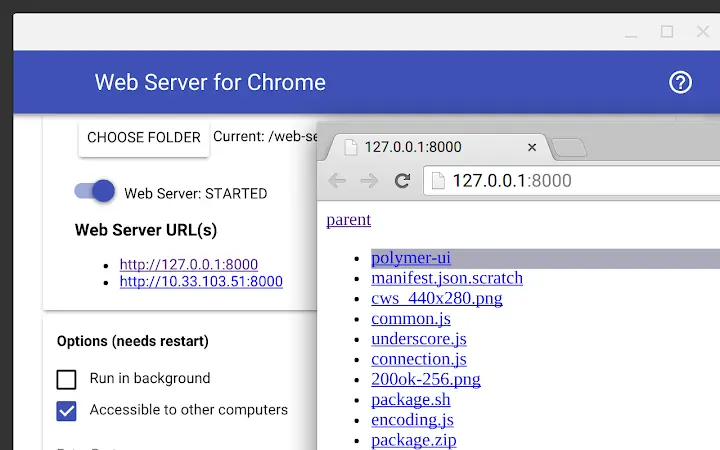
The user interface of Web Server for Chrome is minimal and designed for command-line efficiency. After installation, users access the server through the Chrome app interface, where they can select the directory to serve and configure basic options. The interface does not include visual dashboards or advanced controls, focusing instead on functionality and speed.
Workflow is straightforward: install the app, choose a folder, start the server, and access it via http://127.0.0.1:8887. The server automatically detects and serves files, including index files, and handles common HTTP methods. For users familiar with terminal-based tools, the experience feels familiar and efficient.
Performance is optimized for low resource usage. The developer implemented a persistent listening socket that suspends when idle, helping conserve CPU and RAM. The software is reported to have a small footprint, with a package size of 44 KB, indicating efficient code structure. However, exact performance details such as memory consumption or CPU load were not specified by the developer.
Stability is maintained through continuous bug fixes, particularly in edge cases involving file deletion, connection closing, and socket handling. The software is designed to remain responsive even under high load, though real-world benchmarks were not provided. Overall, the workflow is intuitive and suitable for users who prioritize speed and simplicity over visual polish.
Compatibility & System Requirements
Web Server for Chrome is compatible with Windows, Mac, Linux, and Chrome OS, making it a cross-platform solution. It runs on any device that supports Chrome, including ARM-based Chromebooks, which expands its usability in educational and mobile environments.
The software version is 0.4.8, released on September 22, 2017. The installation size is 44 KB, indicating a highly compact application. The developer did not provide additional system requirements, such as minimum RAM, CPU, or disk space. It is assumed to function on devices with standard Chrome browser capabilities.
Compatibility with modern Chrome versions is not explicitly confirmed, but the project’s long-term maintenance and support for features like the new chrome.sockets API suggest ongoing relevance. Users should ensure their Chrome browser is up to date to avoid potential compatibility issues. The software does not require administrator privileges or external dependencies, enhancing its portability.
Pros and Cons
Pros
- Open source under the MIT license – free to use, modify, and distribute.
- Extremely lightweight at just 44 KB.
- Runs on any device with Chrome, including ARM Chromebooks.
- Supports local network access and file sharing.
- Includes CORS, JSON, and UPnP features for advanced use cases.
- Efficient memory usage with automatic suspension.
- Simple setup and intuitive workflow.
- Active development history with regular updates.
Cons
- No graphical dashboard or visual interface beyond basic app controls.
- Not suitable for production or high-traffic environments.
- Exact performance metrics and system requirements were not specified.
- May require technical knowledge for optimal use.
- Limited to Chrome-based environments; not available outside Chrome apps.
FAQ Section
Is Web Server for Chrome compatible with Chromebooks?
Yes, it runs on Chrome OS and is fully compatible with ARM-based Chromebooks, making it a practical tool for developers using lightweight devices.
Can I use this for file sharing over a local network?
Yes, the server can listen on the local network, allowing other devices to access files served from your directory.
Is the software secure to use?
As an open source tool, it operates within the Chrome sandbox environment, which provides a secure execution context. However, exposing files over a network may pose risks if not properly managed.
How do I update the software?
Updates are managed through the Chrome Web Store. Ensure your Chrome browser is updated and check for available updates in the app settings.
Does it support REST APIs or JSON responses?
Yes, it supports JSON output when the Accept header is set or the ?json=1 parameter is used, making it useful for testing API endpoints.
Final Thoughts + CTA
Web Server for Chrome remains a valuable tool for developers and users seeking a lightweight, portable HTTP server. Its ability to run on any Chrome-enabled device, combined with essential features like network access, CORS, and JSON support, makes it a versatile choice for local development and file sharing. While it lacks a rich UI and is not suited for production use, its simplicity, efficiency, and open-source nature are significant advantages.
It is particularly beneficial for students, educators, and developers working on Chromebooks or low-resource systems. The software’s long-term maintenance and active community support further reinforce its reliability.
Download Web Server for Chrome now to streamline your web development workflow and simplify file sharing across devices.







